
E-mail address
[email protected]
LIJIX DRIVE / FILE REPOSITORY
Business files,within easy reach.
Folders, search, file information, and sharing in one environment.
Organize reports, drawings, spreadsheets, contracts, images, and other work files in Lijix Drive. Find relevant information, review file details, share with authorized colleagues, and connect supported external cloud storage.
Folders & searchMember-based sharingExternal cloud connections
Lijix Drive
Files, folders and connected work.
Files & Folders
| Name & creator | Members | Size | Modified |
|---|---|---|---|
FolderAhmed Hassan | Members3Ahmed HassanSara AliMaya Patel | Size— | Modified |
FolderSara Ali | Members2Sara AliMaya Patel | Size— | Modified |
SpreadsheetMaya Patel | Members2Ahmed HassanMaya Patel | Size12.5 KB | Modified |
PDFAhmed Hassan | Members2Ahmed HassanSara Ali | Size248.0 KB | Modified |
No items in this view.
Try another search or reset the filters.
Application
| Name & creator | Members | Size | Modified |
|---|---|---|---|
FolderSara Ali | Members3Ahmed HassanSara AliMaya Patel | Size— | Modified |
FolderAhmed Hassan | Members3Ahmed HassanSara AliMaya Patel | Size— | Modified |
FolderMaya Patel | Members3Ahmed HassanSara AliMaya Patel | Size— | Modified |
FolderSara Ali | Members3Ahmed HassanSara AliMaya Patel | Size— | Modified |
FolderAhmed Hassan | Members3Ahmed HassanSara AliMaya Patel | Size— | Modified |
No items in this view.
Try another search or reset the filters.
Project files
| Name & creator | Members | Size | Modified |
|---|---|---|---|
FolderAhmed Hassan | Members2Ahmed HassanSara Ali | Size— | Modified |
Word documentSara Ali | Members3Ahmed HassanSara AliMaya Patel | Size34.6 KB | Modified |
No items in this view.
Try another search or reset the filters.
Agreements
| Name & creator | Members | Size | Modified |
|---|---|---|---|
PDFSara Ali | Members2Sara AliMaya Patel | Size186.0 KB | Modified |
No items in this view.
Try another search or reset the filters.
Site photos
| Name & creator | Members | Size | Modified |
|---|---|---|---|
ImageAhmed Hassan | Members2Ahmed HassanSara Ali | Size860.0 KB | Modified |
No items in this view.
Try another search or reset the filters.
Chat
| Name & creator | Members | Size | Modified |
|---|---|---|---|
FolderSara Ali | Members2Ahmed HassanSara Ali | Size— | Modified |
FolderSara Ali | Members2Sara AliMaya Patel | Size— | Modified |
No items in this view.
Try another search or reset the filters.
Tasks
| Name & creator | Members | Size | Modified |
|---|---|---|---|
Text fileAhmed Hassan | Members2Ahmed HassanSara Ali | Size2.8 KB | Modified |
No items in this view.
Try another search or reset the filters.
Vendors
| Name & creator | Members | Size | Modified |
|---|---|---|---|
PDFMaya Patel | Members2Sara AliMaya Patel | Size146.0 KB | Modified |
No items in this view.
Try another search or reset the filters.
Clients
| Name & creator | Members | Size | Modified |
|---|---|---|---|
PDFSara Ali | Members2Ahmed HassanSara Ali | Size210.0 KB | Modified |
No items in this view.
Try another search or reset the filters.
Projects
| Name & creator | Members | Size | Modified |
|---|---|---|---|
Word documentAhmed Hassan | Members3Ahmed HassanSara AliMaya Patel | Size26.4 KB | Modified |
No items in this view.
Try another search or reset the filters.
Channels
| Name & creator | Members | Size | Modified |
|---|---|---|---|
Text fileSara Ali | Members2Ahmed HassanSara Ali | Size4.2 KB | Modified |
No items in this view.
Try another search or reset the filters.
Users
| Name & creator | Members | Size | Modified |
|---|
This example folder is empty.
Use the folder path to go back.
Project-status.csv
- File type
- Spreadsheet
- Size
- 12.5 KB
- Folder
- Files & Folders
- Modified
- Created by
- Maya Patel
Members
- Ahmed Hassan
- Maya Patel
Office-layout.pdf
- File type
- Size
- 248.0 KB
- Folder
- Files & Folders
- Modified
- Created by
- Ahmed Hassan
Members
- Ahmed Hassan
- Sara Ali
Delivery-plan.docx
- File type
- Word document
- Size
- 34.6 KB
- Folder
- Project files
- Modified
- Created by
- Sara Ali
Members
- Ahmed Hassan
- Sara Ali
- Maya Patel
Entrance-survey.jpg
- File type
- Image
- Size
- 860.0 KB
- Folder
- Site photos
- Modified
- Created by
- Ahmed Hassan
Members
- Ahmed Hassan
- Sara Ali
Service-terms.pdf
- File type
- Size
- 186.0 KB
- Folder
- Agreements
- Modified
- Created by
- Sara Ali
Members
- Sara Ali
- Maya Patel
Team-meeting-notes.txt
- File type
- Text file
- Size
- 4.2 KB
- Folder
- Channels
- Modified
- Created by
- Sara Ali
Members
- Ahmed Hassan
- Sara Ali
Launch-checklist.txt
- File type
- Text file
- Size
- 2.8 KB
- Folder
- Tasks
- Modified
- Created by
- Ahmed Hassan
Members
- Ahmed Hassan
- Sara Ali
Maintenance-scope.pdf
- File type
- Size
- 146.0 KB
- Folder
- Vendors
- Modified
- Created by
- Maya Patel
Members
- Sara Ali
- Maya Patel
Service-proposal.pdf
- File type
- Size
- 210.0 KB
- Folder
- Clients
- Modified
- Created by
- Sara Ali
Members
- Ahmed Hassan
- Sara Ali
Delivery-notes.docx
- File type
- Word document
- Size
- 26.4 KB
- Folder
- Projects
- Modified
- Created by
- Ahmed Hassan
Members
- Ahmed Hassan
- Sara Ali
- Maya Patel
Sample file records. Open folders or review file information.
Folders, file details and connected module storage.Illustrative workspace · Lijix
EXPLORE THE CAPABILITIES
A clearer home for business files.
Folders, search, file information, and sharing in one environment. Explore the capabilities and the business information they bring together.
Folders & files
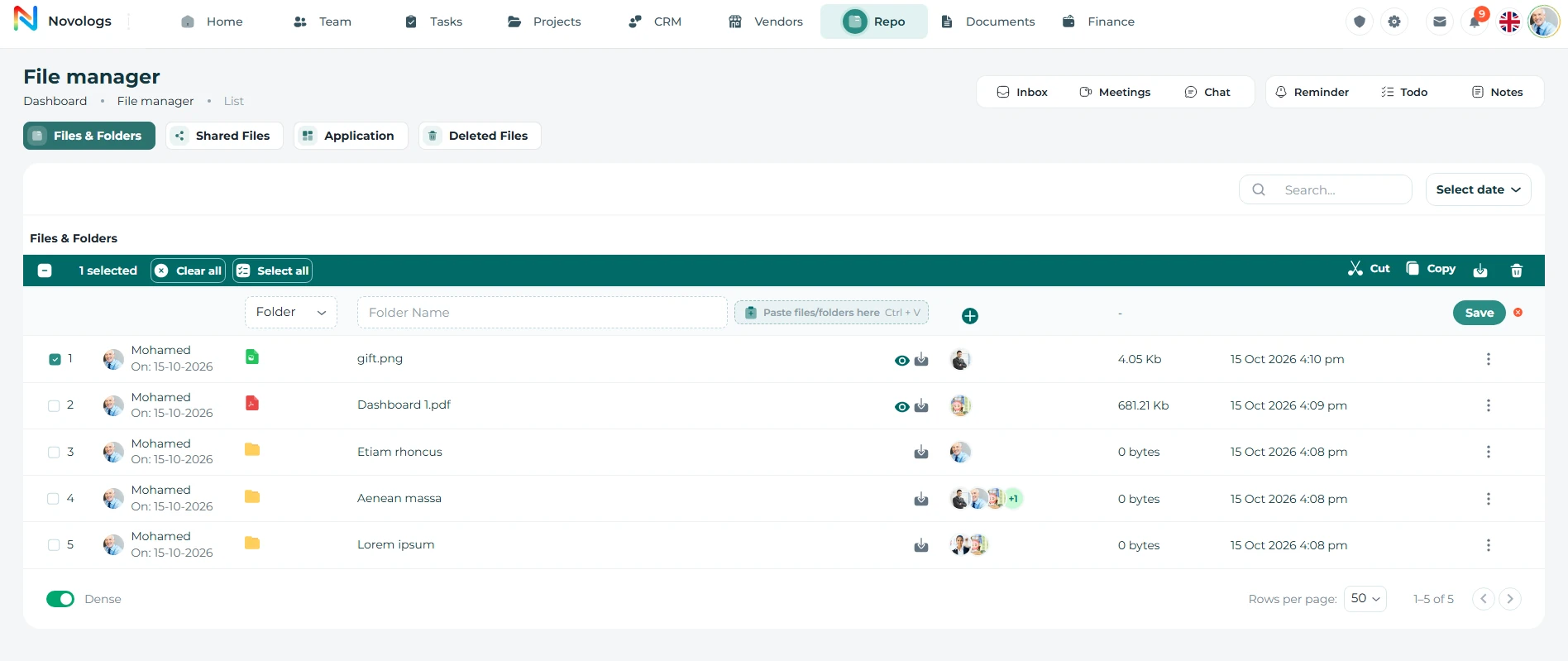
Manage folders and files in one organized table.
View folders and uploaded files with creator details, file type, members, size, modified date, and quick actions from a clean file manager interface.
- Folder List
Organize files under folders like System and General
- File Records
Show file name, type, size, and modified date
- Creator & Members
See who created the item and who has access
- Quick Actions
Use row actions to manage each file or folder
Folders & files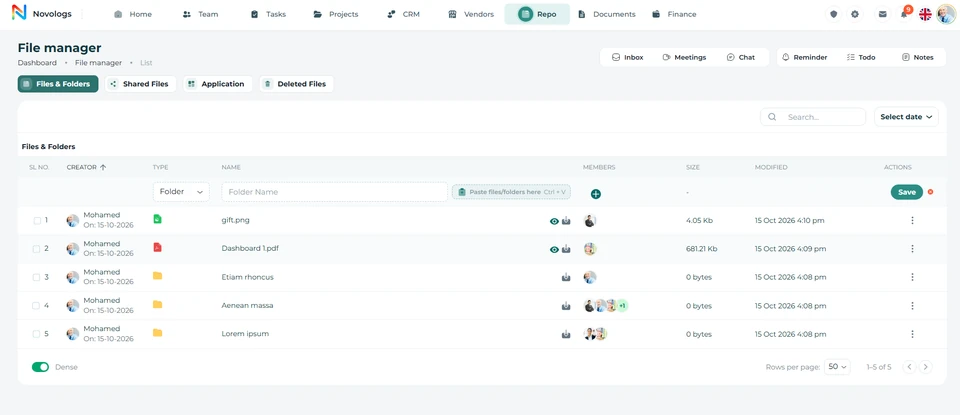 View screenshot
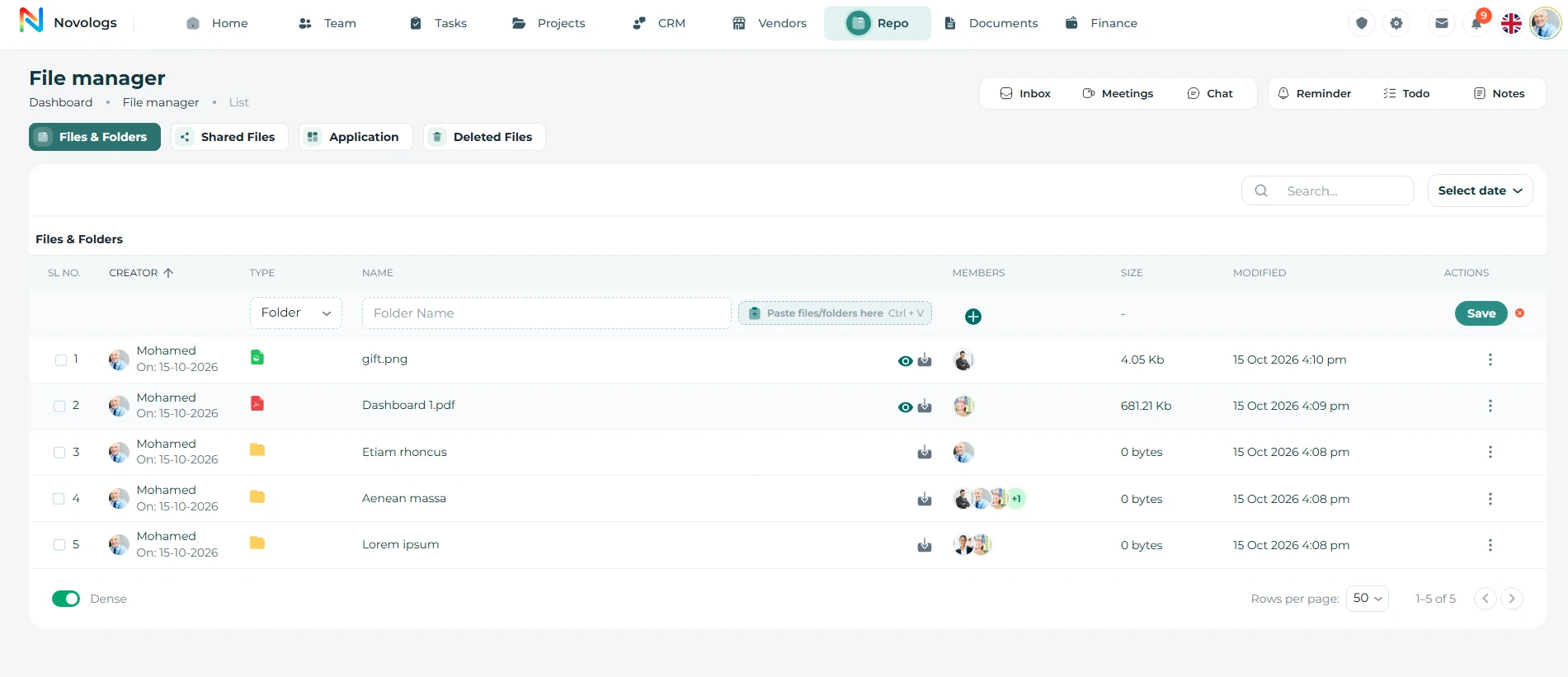 View screenshot
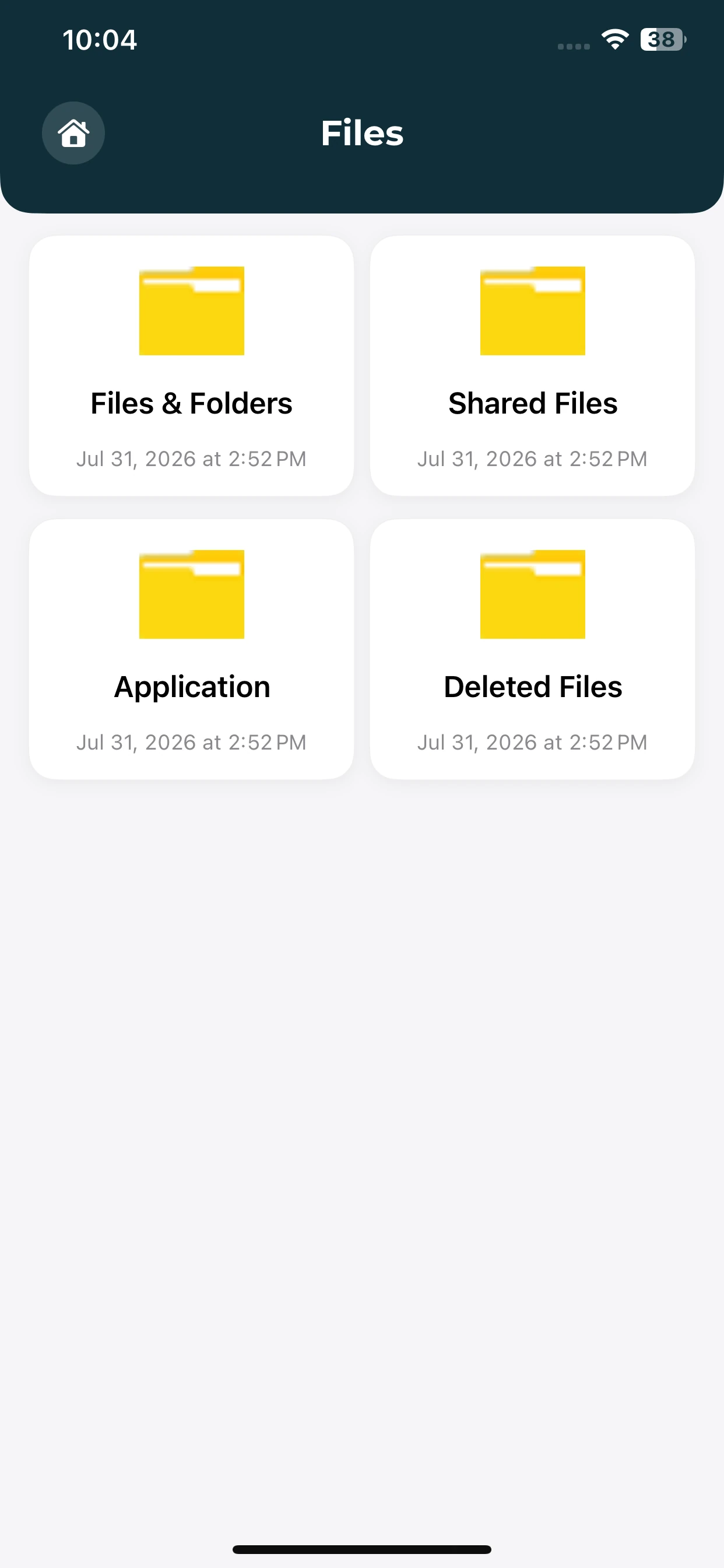
MOBILE / Folders & files
Find your way into business files.
Choose a file area from the mobile repository entry screen.
Files and folders
Open the entry point for your repository.
Shared file area
Locate the shared-files section from the same screen.
Application context
Navigate toward files organized by business module.
Search
Find files and folders quickly with search.
Search across folders and files by name, then open matching records directly from the file manager without browsing through every item manually.
- File Search
Search folders and files by name
- Folder Results
Find matching folders in the list
- File Results
Locate files by filename and type
- Open Results
Open matching files when access is available
WEB & MOBILE
On mobile: Find folders and files quickly; Show matching folders in search results; Open matching files when access allows it.
Search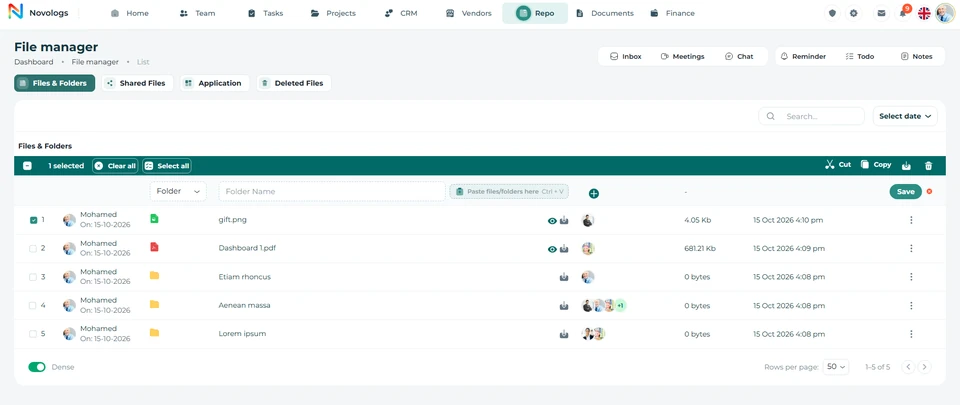 View screenshot
 View screenshot
File information
View file details and open files in a clean file viewer.
Check file name, type, size, modified date, and available actions before opening or downloading the file. On mobile, users can view file details and open supported files through a simple file viewer.
- File Name
Display the selected file name clearly
- File Type
Show whether the item is image, video, or document
- File Metadata
Review file size and last modified time
- File Viewer
Open supported files in a readable view
WEB & MOBILE
On mobile: Open supported files in a mobile-friendly view; Review file name, type, size, and modified date; Download files when permission is available.
Supplier agreement.pdfFile information
PDF
File typeSupported document formatPDF
File sizeIllustrative file metadata1.8 MB
Last modifiedAccessible file recordToday
Shared membersProject team and procurement3 members
View with accessDownload with access
Illustrative workspace · A view of file information in your workspace
View & download
Open and download files directly from the file manager.
Users can open supported files, review file details, and download files when access is available, keeping file actions simple and clear.
- Open Files
Open selected files from the file info panel
- Download Files
Download files when permission is available
- File Info
Review name, size, type, and modified date
- Permission-based Actions
Open and download appear based on access
WEB & MOBILE
On mobile: Open available files from mobile; Review type, size, and modified date first; Download when permission is available.
Supplier agreement.pdfFile information
PDF
File typeSupported document formatPDF
File sizeIllustrative file metadata1.8 MB
Last modifiedAccessible file recordToday
Shared membersProject team and procurement3 members
View with accessDownload with access
Illustrative workspace · A view of view & download in your workspace
Sharing
Share files and folders with selected members.
Share selected files or folders, choose members who should receive access, and keep shared file visibility limited to the right users.
- Share Files
Share selected files with assigned members
- Share Folders
Allow members to access complete folders
- Member Selection
Choose members before sharing access
- Access Control
Keep shared access limited to selected members
WEB & MOBILE
On mobile: Share selected files with chosen members; Allow selected members to access folders; Choose who should receive access.
Shared business informationPermission-based collaboration
Project teamAssigned colleaguesCan view
Document ownerResponsible employeeCan edit
ProcurementContract review teamCan view
Selected membersRole permissionsShared context
Illustrative workspace · A view of sharing in your workspace
Connected Drive
Bring useful files into your working environment.
Lijix Drive is designed to connect with Google Drive, Dropbox, and Microsoft OneDrive. Work with supported external cloud files and use AI assistance to understand accessible business documents.
- Google Drive
Access supported files through the working environment.
- Dropbox
Connect relevant external cloud information.
- Microsoft OneDrive
Bring supported business files into the workspace.
- Document intelligence
Ask questions about supported, accessible documents.
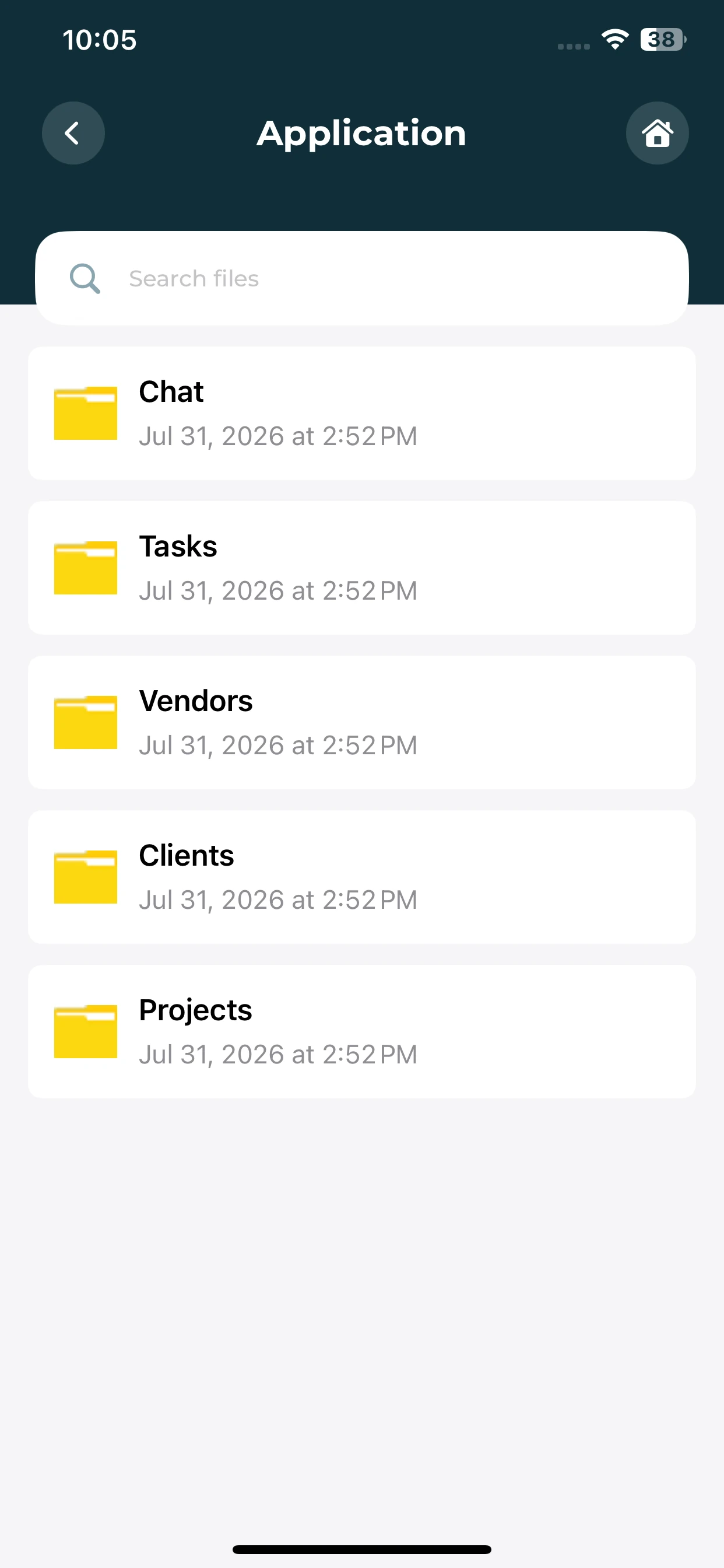
Application files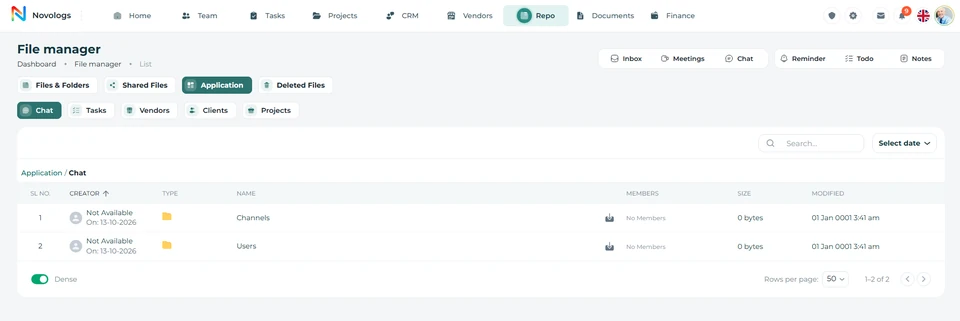 View screenshot
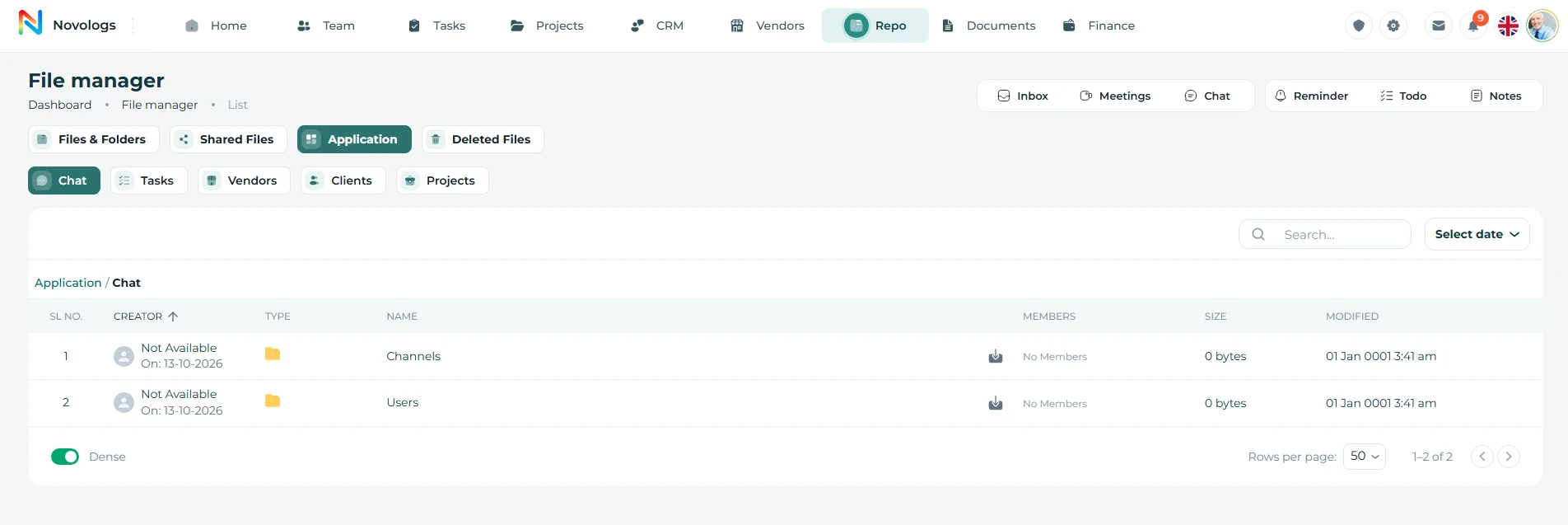 View screenshot
MOBILE / Connected Drive
Files connected to your work.
Browse the application folders associated with conversations and business modules.
Module folders
Find folders for Tasks, Projects, Clients and Vendors.
Conversation context
Locate the Chat folder alongside other module folders.
File search
Use the search field available in the application file area.
FROM INFORMATION TO ACTION
Find, organize, and share with context.
Bring the right information, people, and next actions together in one connected business environment.
- 01
Add files
Bring work documents and supporting information into the repository.
- 02
Organize
Group records by business purpose and related activity.
- 03
Find & access
Search available records and review supported files.
- 04
Share with context
Make the right files available to authorized colleagues.
A FEW USEFUL DETAILS
Working with
business files.
Practical details about business files and the connected working environment.
Which files can the workspace hold?
The Lijix Drive description includes reports, contracts, project documents, presentations, spreadsheets, drawings, images, and other supporting files.
Is file access permission-based?
Yes. Shared information is intended for authorized colleagues. Open/download actions and file/folder sharing follow the access available to the user.
Can existing cloud storage be connected?
Lijix Drive is designed to connect with Google Drive, Dropbox, and Microsoft OneDrive for supported external cloud files.
Can I search within business information?
Lijix supports file search using names, keywords, and supported criteria, with AI document understanding for accessible, supported content.
ONE CONNECTED PLATFORM
Explore the rest
of your workspace.
Follow the people, work, information, and business relationships connected to this module.

Contact
Let’s Connect
Your Business
Your Business
Phone number
+971 4 235 0900
Office Address
City Avenue BuildingDubai, UAE
Business Hours
Monday to Friday: 9:00 AM to 6:00 PMSunday: Closed